Friday, January 14, 2022

Intel RealSense Notes

 SDK:

Git Repository:

https://github.com/IntelRealSense/librealsense/releases/tag/v2.50.0


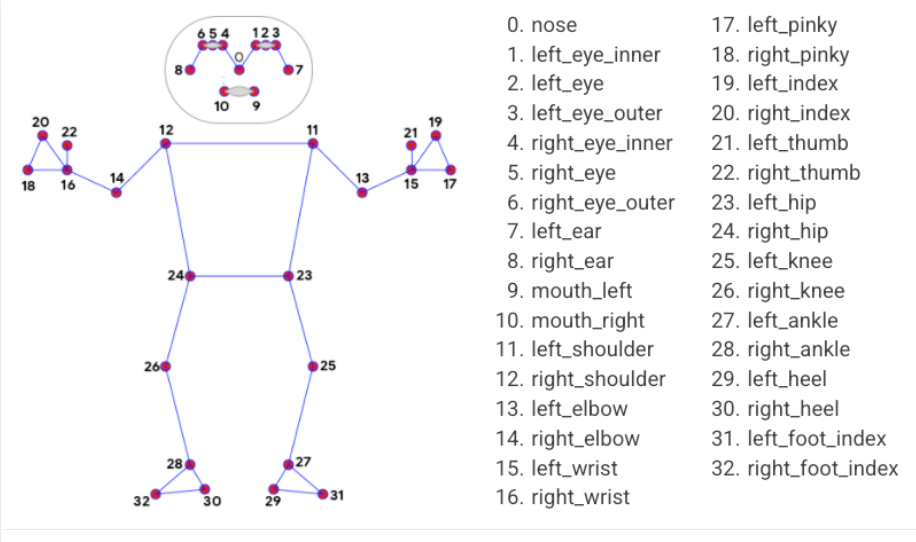
https://www.analyticsvidhya.com/blog/2021/05/pose-estimation-using-opencv/


Visual Odometry

  1. Google Cartographer
  2. GMapping
  3. Hector SLAM
  4. RTabMap
  5. ORB SLAM
  6. Rovio


Robotic Operating System

OpenSource SLAM


+70 case studies from studios & firms using the Unity engine | Case study, testimonials & showcase | Unity


On Raspberry:

https://issueexplorer.com/issue/IntelRealSense/librealsense/9865


Below is practice on Windows 10

Ensure to use correct python to install modules, otherwise, you may get error:
ModuleNotFoundError: No module named

python -m pip install pyrealsense2

pip uninstall pyrealsense2

python -m pip install opencv-python

https://github.com/BakingBrains/Pose_estimation

Link to the Youtube video: https://www.youtube.com/watch?v=brwgBf6VB0I


# Skeleton Tracking

python -m pip install --find-links="%CUBEMOS_SKEL_SDK%\wrappers\python" cubemos.skeletontracking


cd "%CUBEMOS_SKEL_SDK%\wrappers\python"

cd "%CUBEMOS_SKEL_SDK%\samples\python\"

c. Run the sample on a local image

python skeleton-tracking-image.py ..\res\images\skeleton_estimation.jpg

To save the results you can use an additional parameter:

python skeleton-tracking-image.py -o C:\tmp\output.jpg `

..\res\images\skeleton_estimation.jpg

Sunday, December 19, 2021

Flask Web Development

 References:

https://codeburst.io/building-your-first-chat-application-using-flask-in-7-minutes-f98de4adfa5d


Thursday, November 26, 2020

Terraform Modularizing

To improve code reusability and manageability, DevOps engineers are modularizing their code. 

Dependencies Inverse

Depth of Modules

How to pass parameters between modules 

Tuesday, November 24, 2020

Terraform: using template to cast policy

 data "aws_caller_identity" "current" {

}

# Allow the AWS Config role to deliver logs to configured S3 Bucket.
# Derived from IAM Policy document found at https://docs.aws.amazon.com/config/latest/developerguide/s3-bucket-policy.html
data "template_file" "aws_config_policy" {
template = <<JSON
{
"Version": "2012-10-17",
"Statement": [
{
"Sid": "AWSConfigBucketPermissionsCheck",
"Effect": "Allow",
"Action": "s3:GetBucketAcl",
"Resource": "$${bucket_arn}"
},
{
"Sid": "AWSConfigBucketExistenceCheck",
"Effect": "Allow",
"Action": "s3:ListBucket",
"Resource": "$${bucket_arn}"
},
{
"Sid": "AWSConfigBucketDelivery",
"Effect": "Allow",
"Action": "s3:PutObject",
"Resource": "$${resource}",
"Condition": {
"StringLike": {
"s3:x-amz-acl": "bucket-owner-full-control"
}
}
}
]
}
JSON

vars = {
bucket_arn = format("arn:%s:s3:::%s", data.aws_partition.current.partition, var.config_logs_bucket)
resource = format(
"arn:%s:s3:::%s%s%s/AWSLogs/%s/Config/*",
data.aws_partition.current.partition,
var.config_logs_bucket,
var.config_logs_prefix == "" ? "" : "/",
var.config_logs_prefix,
data.aws_caller_identity.current.account_id,
)
}
}

Friday, September 25, 2020

Run CloudFormation in Command Line

 $ aws cloudformation create-stack --stack-name test-vpc --template-body file://vpc/goweekend-vpc-1-dev.yaml --profile my profile --parameters ParameterKey=Environment,ParameterValue=goweekend-devops-esloyalty-vpc-1 ParameterKey=Infrastructure,ParameterValue= ParameterKey=VpcName,ParameterValue=goweekend-devops-esloyalty-vpc-1-prod


$ aws cloudformation delete-stack --stack-name test-vpc --profile my profile

Wednesday, August 12, 2020

Boto3: Client vs Resource vs Session

 Here's some more detailed information on what Client, Resource, and Session are all about.

Client:

  • low-level AWS service access
  • generated from AWS service description
  • exposes botocore client to the developer
  • typically maps 1:1 with the AWS service API
  • all AWS service operations are supported by clients
  • snake-cased method names (e.g. ListBuckets API => list_buckets method)

Here's an example of client-level access to an S3 bucket's objects (at most 1000**):

import boto3

client = boto3.client('s3')
response = client.list_objects_v2(Bucket='mybucket')
for content in response['Contents']:
    obj_dict = client.get_object(Bucket='mybucket', Key=content['Key'])
    print(content['Key'], obj_dict['LastModified'])

** you would have to use a paginator, or implement your own loop, calling list_objects() repeatedly with a continuation marker if there were more than 1000.

Resource:

  • higher-level, object-oriented API
  • generated from resource description
  • uses identifiers and attributes
  • has actions (operations on resources)
  • exposes subresources and collections of AWS resources
  • does not provide 100% API coverage of AWS services

Reference: 

https://stackoverflow.com/questions/42809096/difference-in-boto3-between-resource-client-and-session


Here's the equivalent example using resource-level access to an S3 bucket's objects (all):

import boto3

s3 = boto3.resource('s3')
bucket = s3.Bucket('mybucket')
for obj in bucket.objects.all():
    print(obj.key, obj.last_modified)

Note that in this case you do not have to make a second API call to get the objects; they're available to you as a collection on the bucket. These collections of subresources are lazily-loaded.

You can see that the Resource version of the code is much simpler, more compact, and has more capability (it does pagination for you). The Client version of the code would actually be more complicated than shown above if you wanted to include pagination.

Session:

  • stores configuration information (primarily credentials and selected region)
  • allows you to create service clients and resources
  • boto3 creates a default session for you when needed

A useful resource to learn more about these boto3 concepts is the introductory re:Invent video.

Python argpars

 https://stackoverflow.com/questions/24180527/argparse-required-arguments-listed-under-optional-arguments


In general, the argparse module assumes that flags like -f and --bar indicate optional arguments, which can always be omitted at the command line.

Note: Required options are generally considered bad form because users expect options to be optional, and thus they should be avoided when possible.


parser = argparse.ArgumentParser(description='Foo')
parser.add_argument('-o', '--output', help='Output file name', default='stdout')
requiredNamed = parser.add_argument_group('required named arguments')
requiredNamed.add_argument('-i', '--input', help='Input file name', required=True)
parser.parse_args(['-h'])