Problem:
Sunday, June 28, 2020
Vault: cannot validate certificate for 12 7.0.0.1
Problem:

Friday, April 17, 2020
Eclipse: Set project compiler compliance settings to 1.5 Set project JRE build path entry to 'J2SE-1.5'
Problem:
Set project compiler compliance settings to 1.5
Set project JRE build path entry to 'J2SE-1.5'
Cause:
Project compiler compliance is set to lower than 1.5.
Solution:
Goto Project Properties -> Java Compiler, you will see JDK Compliance in the right panel, Right beneath it:

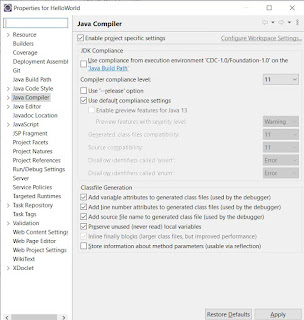
Set project compiler compliance settings to 1.5
Set project JRE build path entry to 'J2SE-1.5'
Cause:
Project compiler compliance is set to lower than 1.5.
Solution:
Goto Project Properties -> Java Compiler, you will see JDK Compliance in the right panel, Right beneath it:

uncheck "Use compliance from execution environment 'CDC-1.0/Foundation-1.0' on the 'Java Build Path'", then choose proper Compiler compliance level:

Tuesday, July 2, 2019
Clockwise Rotating Text
<!DOCTYPE html><html lang='en' class=''>
<head>
<style class="cp-pen-styles">#container {
margin: 0%;
}
#circle {
position: relative;
width: 100%;
padding-bottom: 100%;
overflow: hidden;
}
#circle text {
font-family: "Helvetica Neue", Arial;
font-size: 16px;
font-weight: bold;
}
#circle svg {
position: absolute;
left: 0;
top: 0;
width: 100%;
height: 200px;
-webkit-animation-name: rotate;
-moz-animation-name: rotate;
-ms-animation-name: rotate;
-o-animation-name: rotate;
animation-name: rotate;
-webkit-animation-duration: 5s;
-moz-animation-duration: 5s;
-ms-animation-duration: 5s;
-o-animation-duration: 5s;
animation-duration: 5s;
-webkit-animation-iteration-count: infinite;
-moz-animation-iteration-count: infinite;
-ms-animation-iteration-count: infinite;
-o-animation-iteration-count: infinite;
animation-iteration-count: infinite;
-webkit-animation-timing-function: linear;
-moz-animation-timing-function: linear;
-ms-animation-timing-function: linear;
-o-animation-timing-function: linear;
animation-timing-function: linear;
}
@keyframes rotate {
from {
transform: rotate(0);
}
to {
transform: rotate(360deg);
}
}
</style>
<style>
body {
#background-color: #333;
font-family: 'Luckiest Guy', cursive;
font-size: 35px;
}
path {
fill: #CCEEFF;
}
text {
fill: #1d8703;
}
</style>
</head><body>
<div id="container">
<div id="circle">
<svg version="1.1" xmlns="http://www.w3.org/2000/svg" xmlns:xlink="http://www.w3.org/1999/xlink" x="0px" y="0px" width="200px" height="200px" viewBox="0 0 200 200" enable-background="new 0 0 200 200" xml:space="preserve">
<defs>
<path id="circlePath"
d="
M 100, 100
m 60, 0
a -60,60 0 0,0 -120,0
a -60,60 0 0,0 120,0
"
/>
</defs>
<g>
<use xlink:href="#circlePath" fill="#CCEEFF" />
<text class="text">
<textPath xlink:href="#circlePath"> <<<<<<< A R T H U R R U N N I N G <<<<<<< </textPath>
</text>
</g>
</svg>
</div>
</div>
<desc><path id="circlePath" d="M 100, 100 m -60, 0 a 60,60 0 0,0 120,0 a 60,60 0 0,0 -120,0 " /></desc>
</body></html>
<head>
<style class="cp-pen-styles">#container {
margin: 0%;
}
#circle {
position: relative;
width: 100%;
padding-bottom: 100%;
overflow: hidden;
}
#circle text {
font-family: "Helvetica Neue", Arial;
font-size: 16px;
font-weight: bold;
}
#circle svg {
position: absolute;
left: 0;
top: 0;
width: 100%;
height: 200px;
-webkit-animation-name: rotate;
-moz-animation-name: rotate;
-ms-animation-name: rotate;
-o-animation-name: rotate;
animation-name: rotate;
-webkit-animation-duration: 5s;
-moz-animation-duration: 5s;
-ms-animation-duration: 5s;
-o-animation-duration: 5s;
animation-duration: 5s;
-webkit-animation-iteration-count: infinite;
-moz-animation-iteration-count: infinite;
-ms-animation-iteration-count: infinite;
-o-animation-iteration-count: infinite;
animation-iteration-count: infinite;
-webkit-animation-timing-function: linear;
-moz-animation-timing-function: linear;
-ms-animation-timing-function: linear;
-o-animation-timing-function: linear;
animation-timing-function: linear;
}
@keyframes rotate {
from {
transform: rotate(0);
}
to {
transform: rotate(360deg);
}
}
</style>
<style>
body {
#background-color: #333;
font-family: 'Luckiest Guy', cursive;
font-size: 35px;
}
path {
fill: #CCEEFF;
}
text {
fill: #1d8703;
}
</style>
</head><body>
<div id="container">
<div id="circle">
<svg version="1.1" xmlns="http://www.w3.org/2000/svg" xmlns:xlink="http://www.w3.org/1999/xlink" x="0px" y="0px" width="200px" height="200px" viewBox="0 0 200 200" enable-background="new 0 0 200 200" xml:space="preserve">
<defs>
<path id="circlePath"
d="
M 100, 100
m 60, 0
a -60,60 0 0,0 -120,0
a -60,60 0 0,0 120,0
"
/>
</defs>
<g>
<use xlink:href="#circlePath" fill="#CCEEFF" />
<text class="text">
<textPath xlink:href="#circlePath"> <<<<<<< A R T H U R R U N N I N G <<<<<<< </textPath>
</text>
</g>
</svg>
</div>
</div>
<desc><path id="circlePath" d="M 100, 100 m -60, 0 a 60,60 0 0,0 120,0 a 60,60 0 0,0 -120,0 " /></desc>
</body></html>
Thursday, June 27, 2019
Wednesday, May 1, 2019
Ansible - Create User with Password
To Create User with Password, the password must be encrypted. Reference: https://docs.python.org/3/library/crypt.html
   # created with:
   # python -c 'import crypt; print crypt.crypt("sesame", "$1$opendoor$")'
   - name: check if group exists
     shell: /usr/bin/getent group $group | /usr/bin/wc -l | tr -d ' '
     register: group_exist

   - name: check if user exists
     shell: /usr/bin/getent passwd $user | /usr/bin/wc -l | tr -d ' '
     register: user_exist
   - name: Add user "aniu" to the remote server
     remote_user: root
     user:
       name: apple
       password: $1$opendoor$oFO4rBXnUmwP3W3rK859N.
       comment: "Orange Sales"
       uid: 5571
       group: users
       append: yes
       shell: /bin/bash
       generate_ssh_key: yes
       ssh_key_bits: 2048
       ssh_key_file: .ssh/id_rsa
     only_if: ${user_exist.stdout} == 0
Thursday, February 21, 2019
JSON_ENCODE() – PHP ARRAY TO JSON
http://www.mustbebuilt.co.uk/php/php-and-json-json_encode-and-json_decode/
Saturday, October 13, 2018
Subscribe to:
Comments (Atom)